
For Rotary and Rotaract clubs, Canva has become a go-to resource for public image and communications. It helps us:
Create professional-looking graphics quickly.
Stay consistent with Rotary’s branding.
Share stories in ways that are engaging and modern.
While the free version of Canva is a great way to get started, the Pro version unlocks powerful features and thousands of additional templates, photos, and tools.
💡 Did You Know?
Canva offers its premium Teams plan for free to eligible nonprofits through the Canva for Nonprofits program.
With Canva for Nonprofits, your club can have up to 50 users on one team, all with access to:
Premium images, videos, music, and graphics.
Transparent background downloads.
Expanded Brand Kit: multiple color palettes, custom fonts, and logos.
Publishing designs as templates.
Shared folders and collaborative workspaces.
👉 Learn more: Canva for Nonprofits
📝 Eligibility Requirements
When we created this guide, these were Canva’s requirements (check the eligibility page for updates):
In Canada
Clubs must be registered as one of the following:
A Charity with the Canada Revenue Agency (CRA), OR
A Nonprofit operating entity with tax exemption, OR
A Federal nonprofit corporation, OR
A Provincial nonprofit.
In Saint-Pierre et Miquelon
Clubs must be registered as a:
Nonprofit Association under French law (Loi du 1er juillet 1901) AND published in the Journal Officiel des Associations (or other French legal registry).
🔍 How to Check Your Club’s Registration
Most Rotary clubs in our District will be registered either with the CRA, their province, or the French registry. You can search your club here:
CRA (Charities): Canada Revenue Agency Charities Listing
Nova Scotia: Registry of Joint Stock Companies
New Brunswick: Corporate Affairs Registry
Prince Edward Island: Corporate/Business Names Registry
Newfoundland & Labrador: Registry of Companies
- Saint-Pierre & Miquelon: Journal Officiel des Associations
If your club doesn’t clearly fit one of these categories you MAY be able to apply as a “social impact organization”. If you have any issues please email us at 7815publicimage@googlegroups.com for guidance.
📧 Tips Before You Apply
If you are able use a branded club email whenever possible.
Problematic:
ABCRotary@gmail.comBetter:
contact@ABCRotary.ca
If you use a generic email, make sure it’s published on your website as your official contact address.
Create a Canva account with that email before applying.
Already have a Canva account? You can change your email before applying.
🖥️ Step-by-Step: Applying for Canva for Nonprofits
- Go to Canva.com. If you’re logged in, log out so you can see the homepage.
From the top menu, click Plans → Nonprofit.
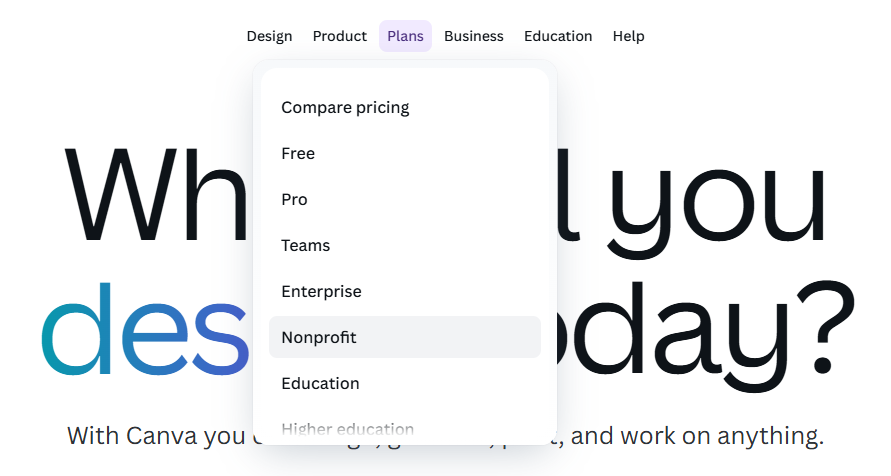
Open the Plans menu and choose Nonprofit. - Click Apply for Canva for Nonprofits.
Log in with the email/account you want to use for your club’s Canva team.
Tip: Use a branded club email (e.g.,contact@ABCRotary.ca) for the best chance of approval.- A window will open with an introduction. Click Get Started.
Choose your type of nonprofit:
- Registered nonprofit organization (for Rotary/Rotaract clubs with CRA, federal, or provincial registration).
- Social impact organization (if your club doesn’t have formal registration but may qualify under Canva’s guidelines).
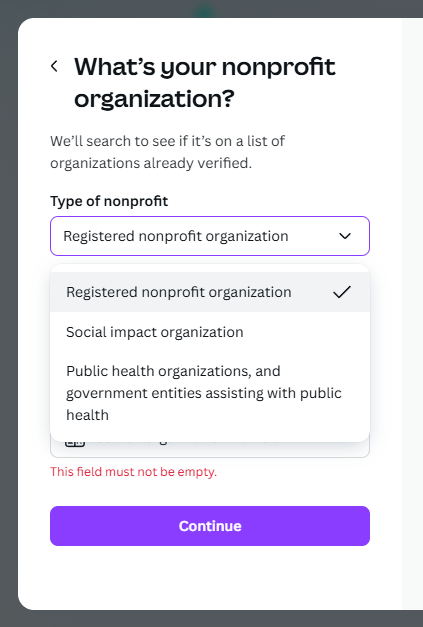
Select the option that matches how your club is registered. Select your country, then search for your Rotary/Rotaract club by name or registry ID.
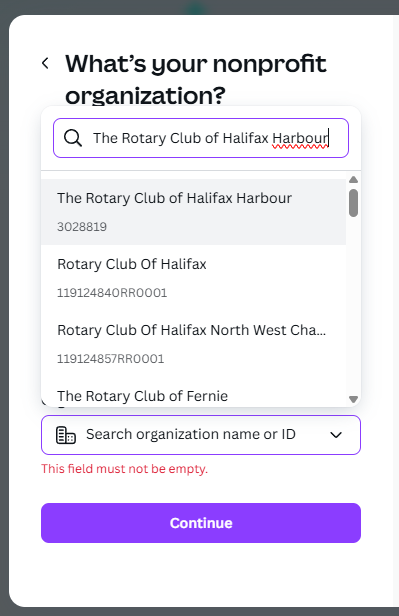
Example: Rotary Club of Halifax appears with its Nova Scotia Joint Stocks number; some clubs show CRA registration IDs. If you can’t find your club, click I can’t find my nonprofit and enter your details manually (including how your club is registered).
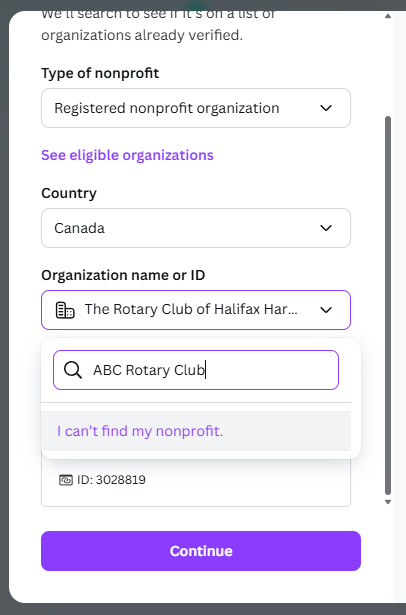
Provide your legal name and registration details if your club doesn’t appear. - Confirm your full name and double-check the email shown (you can’t change it here).
- Click Submit.
- You should see a confirmation page. Watch for an email from Goodstack (Canva’s verification partner); they may ask for supporting documents.
📩 What Happens Next?
You’ll receive an email from Goodstack, the third-party company Canva uses for verification.
They may ask you to create an account and upload additional documents.
You’ll receive updates by email when your application is approved.
🔥 Hot Tip
Everything we do in Rotary should be built around our mission and values — including sustainability. If you and your club are investing time and energy into a Canva account, make sure others can access it in the future.
- If you are using a shared email address, be sure more than one person can access it.
- Better yet, invite multiple people to your Canva Team so that leadership transitions are smooth and no work is lost.
How to add people to your Canva Team
- Log in to your Canva account.
- Click on your Account menu (top right, your profile photo).
- Select Settings → People (or sometimes “Team settings”).
- Click Invite people.
- Enter their email addresses (e.g. club officers or communications team members).
- Choose a role:
- Administrator: full access, including billing and team settings.
- Member: can create and collaborate on designs.
- Click Send invites. Each invited person will get an email to join your Team.
Tip: Keep at least two administrators on your Canva Team so your club never loses access if someone rotates out of their role.
ℹ️ Need Help?
If your club is having issues with the application process, please reach out to us at 7815publicimage@googlegroups.com.
While we encourage clubs to manage their own Canva accounts, we do have limited spots available on the District’s Canva for Nonprofits account.
👉 Don’t forget to visit our Public Image Centre for tools, resources, and content to help your club’s public image thrive.